To install VirtualBox Guest Additions on virtual machines running Debian & Ubuntu, open a terminal and run the following commands:
Update package lists:
sudo apt-get update
Install security updates:
sudo apt-get upgrade
Install required packages for building kernel modules:
- build-essential (informational list of build-essential packages)
- module-assistant (tool to make module package creation easier)
sudo apt-get install build-essential module-assistant
Use module-assistant to download necessary kernel headers:
sudo m-a prepare
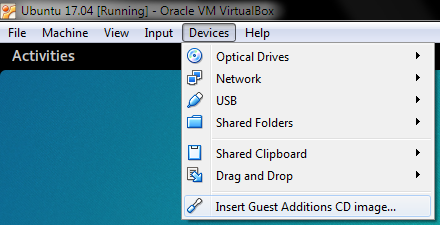
Insert the Guest Additions CD image, using the Devices menu on VirtualBox.
Mount the Guest Additions CD:
sudo mount /dev/cdrom /mnt
Change directory, to where the Guest Additions CD is mounted:
cd /mnt
To make sure we’re in the right place, list the contents of the directory:
ls

Start the installation:
sudo sh ./VBoxLinuxAdditions.run
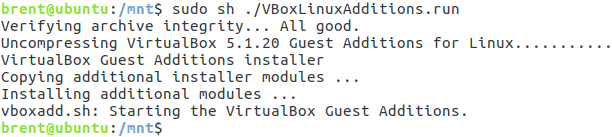
When the installation is complete, reboot the virtual machine:
sudo reboot
Further reading: